Business
Type-C to C vs Type A to Type C Cable: What’s the Difference?

You know those moments when you take a particular cable, connect it to a device, and nothing works as it should, and you have no idea what the problem may be. This happens to all of us, without us even realizing that the problem was the USB itself.
The two most common types of cables that one can choose from are the Type-C to Type-C cable and the Type-A to Type-C cable, among others. Many people purchase whichever of the two is the cheapest without knowing the difference between the two options. So, let’s discuss the differences between them.
- Cables Are Smarter Than They Look
Here is something that I did not know before studying for this blog: a cable is not as simple as it looks.
This brings us to the topic of the type-C to type-C cable vs type a to type-C cable. It’s not just a matter of plugging the right connector into the right port – it also determines how much you can charge your device, how much data you can transfer, and how long the cable can be.
- Type C to Type C: Where Everything’s Headed
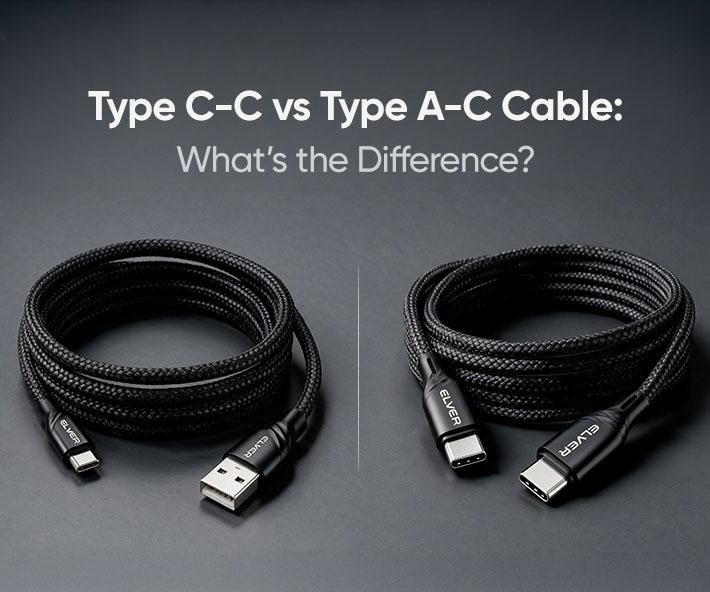
If you’ve bought a phone or laptop in the last couple of years, chances are this cable came in the box. A Type-C to Type-C cable has that small oval USB-C shape on both ends, and the best part is you can plug it in either way. No more fumbling around trying to find the right side.
- Type A to Type C: Still Useful
The Type-A to Type-C cable is probably already sitting in your house somewhere.
One end is that classic rectangular USB-A shape, the one you somehow always try plugging in upside down first, and the other end is USB-C, for whatever newer device you’re connecting to.
- A Mistake I See Constantly
Someone buys a type c to type c cable purely because the shape looks right, then wonders why charging is still slow. The truth is, plenty of cheap cables have the USB-C shape but only support basic 5W charging underneath.
Things Worth Checking Before Buying
- Wattage should match what your device actually supports.
- Long cables can quietly reduce charging speed.
- Braided cables tend to last noticeably longer.
- Stick with a brand you recognize
So, Which One Should You Get?
If your setup is all USB-C already, then a decent Type-C to Type-C cable will suffice for years to come. If you have older gear, keeping a Type-A to Type-C cord around would be useful as well, as you will inevitably need to charge something older down the line.
Conclusion
If your devices are all newer, a Type-C to Type-C cable is your best bet for faster charging and quicker data transfer. But it’s still smart to keep a Type-A to Type-C cable around for older gear.


Type-C to C vs Type A to Type C Cable: What’s the Difference?

How Executive Search Software Selects and Manages Senior Leadership Candidates

Data Science Course in Pune with Placement Support: From Classroom Training to Your First Job

Ethical Hacking Courses in Mumbai with Placement: Institutes, Duration, Fees & Jobs 2026

Best Micro Influencer Agency Singapore: Why Micro Beats Macro for Conversion

What Makes a Crypto Exchange Top-Rated? Understanding the Ranking Criteria
Why These Data Science Institutes in Delhi Are Preferred by Top Tech Recruiters?

How Long Does It Take to Register a Company in USA?

TeraBox Mod APK: Exploring Cloud Storage and File Management on Android

Future of Management Accounting: Why CMA Certification Skills Are in High Demand
How Long Does It Take to Register a Company in USA?

Physical AI Data Requirements: 9 Line Items That Move Eval Scores
Data Science Course in Pune with Placement Support: From Classroom Training to Your First Job
TeraBox Mod APK: Exploring Cloud Storage and File Management on Android
Ethical Hacking Courses in Mumbai with Placement: Institutes, Duration, Fees & Jobs 2026

Enterprise AI Chatbot Platform for Websites: Convert Traffic at Scale

Niyo Zero Forex Markup Credit Card with Lounge Access
Best Micro Influencer Agency Singapore: Why Micro Beats Macro for Conversion
Future of Management Accounting: Why CMA Certification Skills Are in High Demand
What Makes a Crypto Exchange Top-Rated? Understanding the Ranking Criteria


 Tech2 years ago
How to Use a Temporary Number for WhatsApp
- Business3 years ago
Sepatuindonesia.com | Best Online Store in Indonesia
- Social Media2 years ago
The Best Methods to Download TikTok Videos Using SnapTik
- Technology2 years ago
Top High Paying Affiliate Programs
- Tech2 years ago
Understanding thejavasea.me Leaks Aio-TLP: A Comprehensive Guide
- FOOD2 years ago
How to Identify Pure Desi Ghee? Ultimate Guidelines for Purchasing Authentic Ghee Online

 Instagram4 years ago
Free Instagram Auto Follower Without Login
- Instagram4 years ago
Free Instagram Follower Without Login