
Tech
Text to Video AI: Turn Ideas into Stunning Videos with a Prompt

What if you could create a video just by describing it in words? That is exactly what text to video AI makes possible. Instead of filming, editing, and piecing together clips manually, you simply type a prompt describing the scene you want, and the AI generates a video from scratch. No camera, no crew, no editing timeline. For creators, businesses, and everyday users, this technology is removing the biggest barriers to video production and making it as easy as writing a sentence.

What Is Text to Video AI and How Does It Work?
Text to video AI uses advanced deep learning models to interpret written descriptions and turn them into moving visuals. You provide a prompt — something like “a golden retriever running through a field of wildflowers at sunset” — and the AI generates a video clip that matches your words.
Behind the scenes, these models have been trained on enormous datasets of images, videos, and text descriptions. They have learned the relationships between language and visual content. They understand what a sunset looks like, how a dog runs, what wildflowers look like swaying in the breeze, and how all of these elements behave together in motion.
The process generally works in stages. First, the model interprets your text prompt, breaking it down into visual concepts. Then it generates individual frames that represent those concepts. Finally, it stitches those frames together into a smooth, coherent video sequence. Some models also add synchronized audio, including background music and sound effects, to make the result feel complete.
Why AI Matters Right Now
Video content dominates the internet. But creating good videos has always been time-consuming and expensive. Even a simple thirty-second clip can take hours to film and edit.
Text to video AI changes that entirely. It puts video creation within reach of everyone. You do not need to own a camera. You do not need editing software. You just need an idea and the words to describe it.
This matters most for people and teams who need video content regularly but lack the time, budget, or technical skills. Think solo content creators posting daily on TikTok, small business owners who need product videos, educators building course materials, or marketing teams running campaigns across multiple channels. For all of these people, text to video AI is a genuine game changer.
What You Can Create with a Simple Prompt
The range of content you can produce with text to video is surprisingly broad. Here are some common use cases that are already mainstream.
Social media content. Short, attention-grabbing clips for Instagram Reels, TikTok, or YouTube Shorts. Describe a trending concept or a visually striking scene, and you have a post ready to publish.
Product showcases. Describe your product in action, and the AI generates a video that brings it to life. This is especially useful for e-commerce sellers who need video ads but do not have the resources for professional production.
Explainer and educational videos. Teachers, trainers, and course creators can describe concepts visually and get animated explainers without hiring a motion graphics team.
Storytelling and creative projects. Writers, filmmakers, and artists can visualize scenes from scripts, storyboards, or creative briefs. It is a fast way to prototype ideas before committing to full production.
Marketing campaigns. Agencies and in-house teams can generate multiple video variations for A/B testing, social ads, or pitch presentations without waiting on production schedules.
A Practical Tool Worth Trying
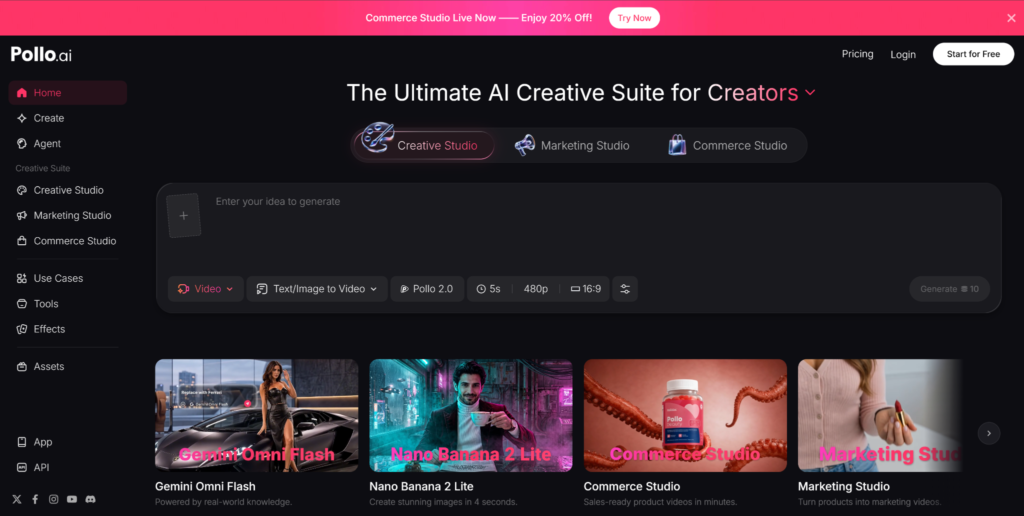
If you are ready to experiment with text to video, Pollo AI is a solid platform to start with. It brings together multiple leading AI video models in one place, so you can try different approaches and find the style that works best for your content. You type your prompt, choose your preferred model, and get a generated video in seconds.
Beyond text to video, Pollo AI offers a wide range of AI-powered creative tools, including image to video, video editing, and audio generation. It also has a built-in AI video studio that provides 100+ video apps for every creator — from fast social clips and ads to cinematic trailers, music visuals, and playful meme videos. It is designed to be an all-in-one workspace where you can handle multiple creative tasks without switching between different apps. Whether you are working from a desktop or using the mobile app on the go, the workflow stays simple and accessible.
For anyone producing content regularly, having everything in one place saves a meaningful amount of time and effort.
Tips for Writing Better Prompts
The quality of your text to video output depends heavily on how well you write your prompt. Here are a few practical tips.
Be specific. Instead of “a person walking,” try “a young woman in a red dress walking along a cobblestone street in Paris during golden hour.” The more detail you give, the closer the result will match your vision.
Describe the mood. Words like “cinematic,” “dreamy,” “energetic,” or “calm” help the AI understand the tone you are going for.
Mention camera angles. If you want an aerial shot, a close-up, or a slow pan, include that in your prompt. Many models can interpret these instructions and adjust the output accordingly.
Keep it clear. Avoid contradictory descriptions or overly complex sentences. A focused, well-structured prompt consistently produces better results than a long, rambling one.
The Road Ahead for Text to Video
AI is still evolving fast. Every few months, new models arrive with better motion quality, longer video lengths, more accurate prompt interpretation, and more realistic visuals.
But you do not need to wait for perfection to start benefiting from text to video AI. The tools available right now are already good enough to produce content that performs well on social media, supports marketing campaigns, and communicates ideas effectively.
The smartest move is to start experimenting now. Creators and businesses that adopt this technology early will have a real advantage. All it takes is an idea and a few words to get started.

Web UI Design Services, Custom Web App Development, or Local Product Design: Where to Start

Type-C to C vs Type A to Type C Cable: What’s the Difference?

How Executive Search Software Selects and Manages Senior Leadership Candidates

Data Science Course in Pune with Placement Support: From Classroom Training to Your First Job

Ethical Hacking Courses in Mumbai with Placement: Institutes, Duration, Fees & Jobs 2026

Best Micro Influencer Agency Singapore: Why Micro Beats Macro for Conversion

What Makes a Crypto Exchange Top-Rated? Understanding the Ranking Criteria
Why These Data Science Institutes in Delhi Are Preferred by Top Tech Recruiters?

How Long Does It Take to Register a Company in USA?

TeraBox Mod APK: Exploring Cloud Storage and File Management on Android
Data Science Course in Pune with Placement Support: From Classroom Training to Your First Job
How Long Does It Take to Register a Company in USA?
Ethical Hacking Courses in Mumbai with Placement: Institutes, Duration, Fees & Jobs 2026
Best Micro Influencer Agency Singapore: Why Micro Beats Macro for Conversion
What Makes a Crypto Exchange Top-Rated? Understanding the Ranking Criteria
Why These Data Science Institutes in Delhi Are Preferred by Top Tech Recruiters?
How Executive Search Software Selects and Manages Senior Leadership Candidates
Type-C to C vs Type A to Type C Cable: What’s the Difference?
Web UI Design Services, Custom Web App Development, or Local Product Design: Where to Start


 Tech2 years ago
How to Use a Temporary Number for WhatsApp
- Business3 years ago
Sepatuindonesia.com | Best Online Store in Indonesia
- Social Media2 years ago
The Best Methods to Download TikTok Videos Using SnapTik
- Technology2 years ago
Top High Paying Affiliate Programs
- Tech2 years ago
Understanding thejavasea.me Leaks Aio-TLP: A Comprehensive Guide
- FOOD2 years ago
How to Identify Pure Desi Ghee? Ultimate Guidelines for Purchasing Authentic Ghee Online

 Instagram4 years ago
Free Instagram Auto Follower Without Login
- Instagram4 years ago
Free Instagram Follower Without Login