Phones
How Long Do Samsung Phones Last? Lifespan, Software Updates, and the Right Time to Upgrade

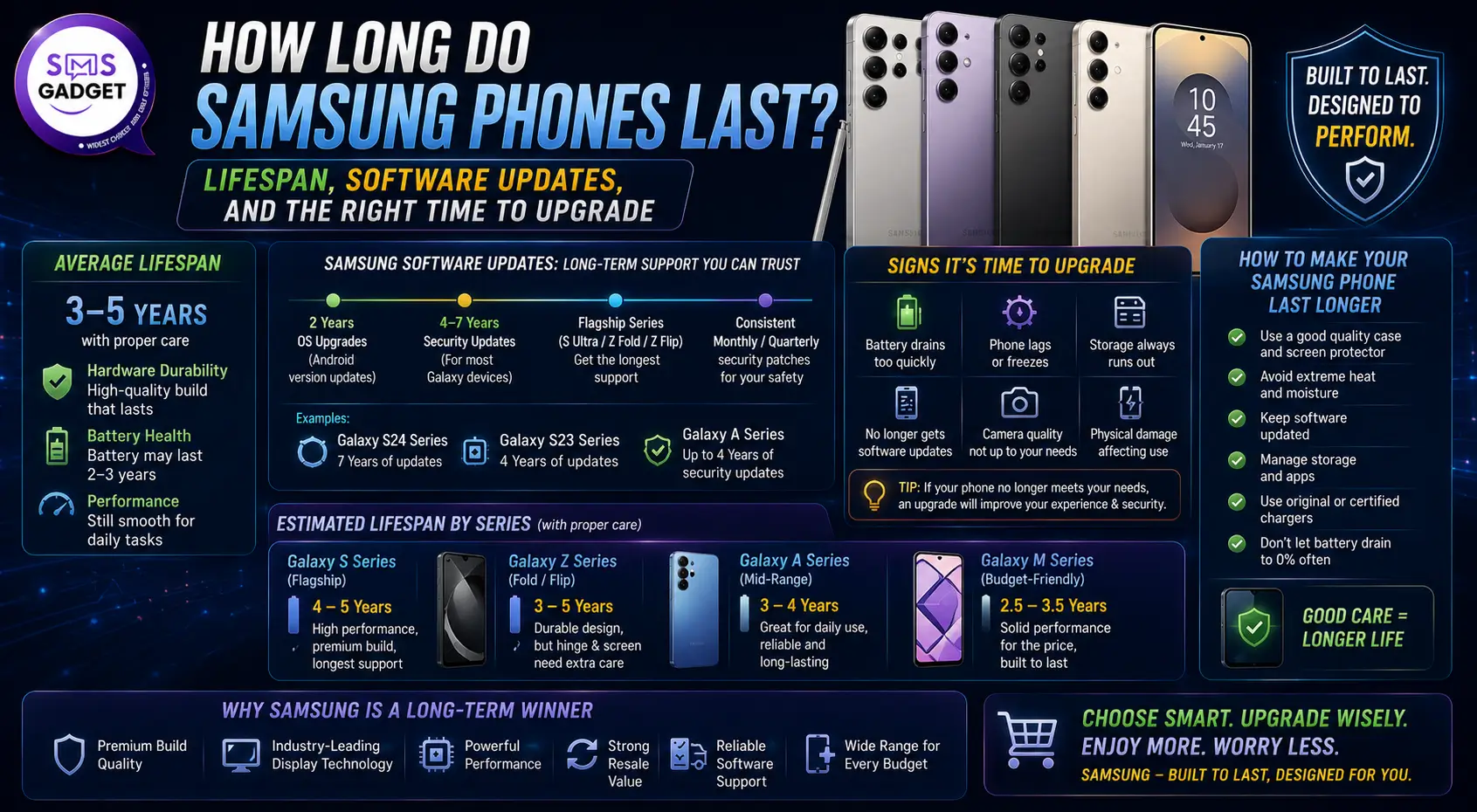
One of the most typical queries from Samsung buyers, both before and after buying, is: How long will this phone last?
It’s a valid question. Flagship Samsung phones are not inexpensive. Whether you spend $700 on a Galaxy S26 or $1,299 on an S26 Ultra, you want to know that your investment will last for years rather than months.
In real-world use, most Samsung phones endure between three and six years. The Galaxy S24 and newer flagship models can realistically last 5 to 7 years due to Samsung’s 7-year software update guarantee. Budget Galaxy A-series phones typically survive three to four years before software support expires.
This guide includes everything: typical Samsung phone lifespan by series and the 7-year software update strategy explained.
How Long Do Samsung Phones Last on Average?
The average Samsung phone lifespan in 2026 sits between 3 and 6 years, depending on the model tier and how the phone is used and maintained.
That range is wide — intentionally so. A Galaxy A15 used by a light user and a Galaxy S26 Ultra used by a power user have very different lifespans, even if they are both Samsung devices. Understanding where your model falls helps you set realistic expectations.
Samsung Flagship Lifespan — Galaxy S and Z Series
Galaxy S-series phones—the S24, S25, S26, and Z Fold and Z Flip foldables—are Samsung’s most durable and longest-supported devices.
With Samsung’s 7-year update policy now in effect for all flagships from the Galaxy S24 onward, these phones can theoretically remain on supported software until 2031 (Galaxy S24) or 2033 (Galaxy S26). In practice, most flagship owners will use their phones for 4 to 5 years before the hardware starts feeling meaningfully outdated compared to what is available.
A Galaxy S24 or newer flagship can realistically last 5 to 7 years before software support expires. Hardware-wise, the phone may remain physically functional well beyond that — but daily use will become increasingly frustrating as apps grow heavier and the chip no longer keeps up.
Samsung Mid-Range Lifespan — Galaxy A Series
Galaxy A-series phones target the mid-range market and are significantly more popular globally than the flagship S-series. Their lifespan is shorter:
- Galaxy A56 and A36 (2025 and newer): 6 years of security updates and 6 OS upgrades — a significant improvement over older A-series models
- Older Galaxy A-series (A54, A53, and earlier): typically 4 years of security updates and 3 to 4 OS upgrades
- Entry-level Galaxy A models: often 2 to 3 years of support before the update window closes
For most Galaxy A users, the practical lifespan is 3 to 4 years before the combination of declining performance, reduced software support, and battery degradation makes upgrading the better choice.
Samsung Lifespan by Model — 2026 Reference
| Model | Support Ends (Estimated) | Practical Lifespan |
| Galaxy S26 / S26+ / S26 Ultra | February 2033 | 5–7 years |
| Galaxy S25 / S25+ / S25 Ultra | January 2032 | 5–7 years |
| Galaxy S24 / S24+ / S24 Ultra | January 2031 | 5–7 years |
| Galaxy Z Fold 6 / Z Flip 6 | 2031 | 5–7 years |
| Galaxy S23 series | 2027 | 4–5 years |
| Galaxy S22 series | End of support in 2026 | 4 years (now ending) |
| Galaxy A56 / A36 | 2031 | 4–5 years |
| Galaxy A35 / A55 | 2028 | 3–4 years |
| Galaxy A15 / A25 | 2026–2027 | 2–3 years |
Important: These dates count from the phone’s original release date, not your purchase date. If you buy a Galaxy S24 today in 2026, its support window has already been running for about two years—meaning roughly 5 more years of software updates remain.
Samsung’s 7-Year Software Update Policy — Everything You Need to Know
Samsung’s shift to a 7-year software update policy is the single biggest change to Samsung phone longevity in the brand’s history. It is worth understanding exactly what it means and what it does not mean.
Which Samsung Phones Get 7 Years of Updates?
The 7-year update policy applies to Samsung’s flagship devices starting from the Galaxy S24 series. As of 2026, the following models are confirmed for 7 years of both Android OS updates and security patches:
- Galaxy S24, S24+, S24 Ultra, S24 FE
- Galaxy S25, S25+, S25 Ultra, S25 Edge
- Galaxy S26, S26+, S26 Ultra
- Galaxy Z Fold 6, Z Flip 6, and all newer foldables
- Galaxy Tab S10+, Tab S10 Ultra, and newer flagship tablets
The Galaxy S23 and older S-series phones are not covered by the 7-year policy. The S23 series received 4 years of OS updates and 5 years of security patches — still a solid commitment, but shorter than the current standard.
What Does “7 Years of Updates” Actually Mean?
For a Galaxy S26 launched in February 2026 with Android 16 (One UI 8.5), seven years of updates means:
- It will receive major Android OS upgrades through Android 23 (One UI 15), expected around 2032–2033
- It will receive monthly security patches throughout that same period
- Software support officially ends around February 2033
After that date, the phone still works — it simply stops receiving new features and security patches. At that point, the security risk of continued use begins to grow, and most users would consider upgrading.
The Real-World Reality of 7-Year Updates
The 7-year policy is genuinely impressive and represents Samsung finally matching Apple’s long-standing commitment to software longevity. However, some honest nuance is worth understanding:
Update frequency may slow over time. Samsung has indicated that monthly security patches are prioritized for at least the first four years. In later years of the support window, updates may arrive quarterly rather than monthly.
Performance is the bigger practical limit. A Galaxy S24 running Android 21 in 2030 will be receiving software support — but whether its hardware keeps up with the demands of that software is a different question. Flagship chips age better than budget chips, but no phone feels as fast at year 6 as it did at year 1.
The 7-year policy raises Samsung’s floor significantly. Before 2024, Samsung flagships received 3 to 4 years of OS updates. Doubling that window is a meaningful improvement for anyone who wants to keep a phone for a long time without security concerns.
What Actually Limits a Samsung Phone’s Lifespan?
Software support is not always the reason Samsung phones stop being usable. In practice, three factors end a phone’s useful life most often.
Battery Degradation — The Most Common Lifespan Limiter
Battery health is the primary reason most people replace their Samsung phones. Lithium-ion batteries—the type used in every Galaxy phone—degrade with every charge cycle.
A charge cycle is one full discharge and recharge, whether done in one sitting or accumulated across multiple partial charges. Samsung phone batteries typically begin showing noticeable degradation after 300 to 500 charge cycles, which translates to roughly 1 to 1.5 years of daily use if you charge your phone once per day.
What this looks like in practice: a Galaxy phone that lasted a full day on one charge when new may need a top-up by early afternoon after 2 to 3 years of daily use. After 4 years, heavy users may find their batteries draining to near-empty by mid-day.
The good news: battery replacement can extend a Samsung phone’s useful life by 1 to 2 full years. A Galaxy technician or third-party repair shop can replace the battery for approximately $60 to $100, which is a worthwhile investment if everything else about the phone still meets your needs.
Charging habits directly affect how fast your battery degrades. The habits that accelerate degradation fastest are: consistently charging to 100%, regularly letting the battery drain to 0%, and leaving the phone plugged in overnight on a hot surface. Samsung’s built-in battery settings include a protection mode that caps charging at 85%—enabling this setting meaningfully extends long-term battery health.
Physical Damage — Screens, Ports, and Water Resistance
Physical damage is the second most common reason Samsung phones stop being used before their software support ends. Cracked screens, damaged charging ports, and water damage account for a large share of early phone replacements.
Modern Galaxy flagships use Gorilla Glass Armor, which significantly reduces scratch damage, and IP68 water resistance ratings (on S-series phones), which protect against submersion in up to 1.5 meters of water for 30 minutes. These protections are genuinely useful, but they are not absolute—drops from height, long-term port exposure, and wear over time all take their toll.
A protective case and screen protector remain the most cost-effective way to extend a Samsung phone’s physical lifespan. The investment of $20 to $40 on protection can prevent a $200 to $300 screen replacement.
Performance Slowdown — Apps Growing Heavier Than the Chip
Over time, apps grow more demanding. Android versions become more feature-rich. The camera app adds new AI processing requirements. Games that ran smoothly in 2024 may stutter on the same chip in 2028.
Flagship chips—the Snapdragon 8 Elite used in the Galaxy S25 and S26 series—age significantly better than budget chips because they start with more headroom. A mid-range chip in a Galaxy A25 that already runs close to its limit in 2024 will feel genuinely sluggish by 2027. A Snapdragon 8 Elite chip from 2025 will still handle most tasks competently in 2030.
This is one of the strongest arguments for buying a flagship over a mid-range phone if longevity is a priority: the performance headroom you pay for today translates into more useful years at the back end.
Samsung Phone Battery Life — Year by Year
Understanding how Samsung battery health changes over time helps you decide whether a battery replacement or full upgrade is the right next step.
New Galaxy flagship batteries typically offer 8 to 12 hours of continuous screen-on time. The Galaxy S25 Ultra, for example, managed approximately 37 hours of mixed real-world use in independent testing — often going two days between charges for moderate users.
Here is a realistic year-by-year picture for a Galaxy flagship with average daily use:
| Year of Use | Expected Battery Health | What It Feels Like |
| Year 1 | 95–100% | Full-day battery, often lasting into the next morning |
| Year 2 | 85–95% | Still comfortable for full-day use for most users |
| Year 3 | 75–85% | Heavy users notice a decline; moderate users still fine |
| Year 4 | 65–80% | Noticeably shorter endurance; top-ups become common |
| Year 5 | 55–70% | Battery replacement strongly recommended at this stage |
| Year 6+ | Below 55% | Significantly degraded; replacement or upgrade necessary |
These figures assume roughly one full charge cycle per day. Users who charge their phones multiple times daily — common among heavy phone users — will see these thresholds reached earlier. Users who follow good charging habits and charge more conservatively will see slower degradation.
Samsung’s built-in battery health tool: on Galaxy phones running One UI 6 and later, you can check your battery health directly in Settings > Battery > Battery health. This shows the current capacity as a percentage of the original capacity. Many third-party apps also show this figure.
5 Clear Signs Your Samsung Phone Needs to Be Replaced
Knowing when to replace a phone is as important as knowing how to maintain one. These are the five clearest signs that upgrading makes more sense than continuing:
1. Battery No Longer Lasts the Day
If your phone reaches 0% before your day ends — even after reducing screen brightness, turning off background refresh, and enabling battery saver — and a battery replacement is not economically practical, it is time to upgrade. This is the most common and most legitimate upgrade trigger.
2. Performance Has Become Genuinely Disruptive
Occasional lag is normal on any phone. But if apps crash regularly, the camera takes several seconds to open, switching between apps causes visible stuttering, or the phone freezes during basic tasks, and a factory reset did not fix it, the hardware is no longer adequate for the software it is running.
3. Software Updates Have Ended
Once your Samsung phone stops receiving security patches, it becomes increasingly vulnerable to known security exploits. Apps also begin dropping compatibility with older Android versions over time. If your phone is no longer on Samsung’s update schedule, every month that passes increases your exposure to security risks.
4. The Screen or Charging Port Is Damaged
A cracked screen that affects touch response or visibility, or a charging port that requires precise cable positioning to make a connection, makes the phone genuinely difficult to use daily. Repair costs for flagship Samsung screens can reach $200 to $350, at which point the math often favors upgrading instead.
5. You Are Missing Features That Matter to Your Daily Life
New camera systems, AI features, faster 5G connectivity, and improved displays are not just marketing — they represent real changes in what a phone can do. If there are features on current Samsung phones that would meaningfully improve how you work, create, or communicate, and your current phone cannot deliver them, that is a valid reason to upgrade.
When Is the Right Time to Upgrade Your Samsung Phone?
The ideal upgrade timing depends on your phone’s generation, its current condition, and your personal needs. Here is a practical framework:
If You Own a Galaxy S24 or Newer (7-Year Update Policy)
You are in the best position of any Samsung owner. Your phone will receive full Android OS updates and security patches for several more years. Unless your battery has degraded significantly or you have a specific feature need, there is no urgency to upgrade.
The recommended approach: focus on battery health. If the battery drops below 80% capacity, get it replaced. This single action can extend your phone’s useful life by 1 to 2 years at a fraction of the cost of a new device.
If You Own a Galaxy S22 or S23
The Galaxy S22 series reached the end of its major OS update support in early 2026. It still receives some security patches, but new Android features will no longer arrive. If your S22 is otherwise running well, it remains usable for basic daily tasks — but the security window is narrowing.
The Galaxy S23 series still has several years of updates remaining. There is no pressing need to upgrade in 2026 unless your battery or performance is struggling.
If You Own a Galaxy A-Series Phone from 2022 or Earlier
Budget and mid-range Galaxy A phones from 2022 and earlier are likely nearing or past their software support end dates. If you are on a Galaxy A53, A52, or similar model, checking your device’s update status in Settings is worth doing. If updates have ended, upgrading becomes a matter of security rather than preference.
The Smart Upgrade Windows
There are three moments in the year when upgrading a Samsung phone delivers the best value:
January–February: Samsung launches its annual Galaxy S-series flagships. The new models’ release and previous-generation S-series phones—which are functionally excellent—drop significantly in price within days of the announcement.
September–October: Samsung typically launches Galaxy A-series updates and Galaxy Z Fold and Flip models. Older A-series phones are discounted heavily.
Holiday season (November–December): major promotions, trade-in bonuses, and carrier deals make this one of the best windows to upgrade at reduced cost.
For most users, upgrading every 3 to 4 years strikes the right balance between staying current and getting full value from the phone they own.
How to Make Your Samsung Phone Last Longer?
If your phone is working well but showing early signs of aging, these steps can meaningfully extend its useful life before you need to make a buying decision.
Enable Battery Protection Mode
Go to Settings > Battery > More battery settings > Protect battery. This caps your maximum charge at 85%, reducing the mechanical stress on the battery during each cycle. Over the life of the phone, this extends battery longevity noticeably—particularly for users who habitually charge overnight.
Keep Your Software Updated
Every security update Samsung releases plugs known vulnerabilities. Staying current on updates is the single easiest thing you can do to keep your phone performing well and staying secure. Go to Settings > Software update > Download and install to check for available updates.
Avoid Extreme Temperatures
Heat is a lithium-ion battery’s worst enemy. Leaving a Samsung phone in a hot car, charging it in direct sunlight, or using it heavily during fast charging all generate heat that accelerates battery degradation. Keeping the phone in a reasonable temperature range during charging extends battery lifespan meaningfully.
Replace the Battery Before Replacing the Phone
When battery health drops below 80% — roughly when you start noticing significant day-to-day decline — a battery replacement is often the most cost-effective decision. At $60 to $100, a new battery effectively gives you a phone that performs like new for a fraction of the replacement cost. Samsung-authorized service centres and many independent repair shops offer this service.
Use a Case and Screen Protector
Physical protection is the simplest form of phone longevity management. A good protective case prevents the corner and back damage that leads to internal hardware problems over time. A tempered glass screen protector prevents the screen scratches that accumulate over years of use. These protections cost very little compared to a screen replacement.
Manage Storage Proactively
Phones running with less than 10% of storage free noticeably slow down—Android needs space to manage temporary files, caching, and system functions. Regularly clearing unused apps, offloading photos to cloud storage, and managing downloads keeps performance smoother for longer.
Samsung Phone Lifespan vs. iPhone — How Do They Compare?
This is a common question for anyone deciding between platforms, so it is worth addressing directly.
Software support: Both Samsung (Galaxy S24 and newer) and Apple (iPhone) now offer 7 years of software updates. This represents a genuine catch-up by Samsung—three years ago, Samsung flagships received 3 to 4 years of OS updates while iPhones received 5 to 6 years. The gap has now closed significantly.
Real-world longevity: iPhone still holds a slight edge in real-world performance longevity. Apple’s A-series chips tend to remain fast and fluid for longer because Apple controls both hardware and software—the chip is optimized precisely for the OS running on it. Samsung flagship chips are excellent, but Android’s broader app ecosystem and occasional OS overhead can create more visible performance decline over time.
Battery and physical durability: Samsung flagships now use Gorilla Armor Glass and IP68 water resistance comparable to iPhone. Battery sizes are larger on Samsung. Both brands’ batteries degrade at similar rates under similar use conditions.
Resale value: iPhones hold resale value significantly better than Samsung phones. A 3-year-old flagship iPhone is worth considerably more than a 3-year-old Galaxy S at the same tier.
If you plan to use your phone for 5 or more years, both brands now offer adequate software support for that commitment. For maximum real-world longevity and resale value, iPhone edges ahead. For maximum features, hardware variety, and AI tools during those years, Samsung delivers more.
And if you are ready to buy from a reliable source, your trusted online mobile shop in Bangladesh is offering an original warranty, competitive pricing, and the full current Samsung lineup.
Frequently Asked Questions
How long do Samsung phones last on average?
Most Samsung phones last 3 to 6 years in real-world use. Galaxy S24, S25, and S26 flagship models can last 5 to 7 years because they receive 7 years of Android OS and security updates from Samsung. Mid-range Galaxy A phones typically last 3 to 4 years before software support ends and performance declines noticeably.
Does Samsung really support phones for 7 years?
Yes — for flagship models starting from the Galaxy S24 series. Samsung has committed to 7 years of both Android OS upgrades and security patches for the S24, S25, S26 series, and flagship foldables from the Z Fold 6 and Z Flip 6 onward. Older models like the S23 receive 4 years of OS updates and 5 years of security patches. Budget A-series phones receive shorter windows.
What is the most common reason Samsung phones stop working?
Battery degradation is the most common reason. Samsung phone batteries typically deliver optimal performance for 2 to 3 years — roughly 300 to 500 full charge cycles — before noticeable capacity decline begins. After 4 to 5 years of daily use, most batteries have degraded significantly enough to disrupt daily usability. A battery replacement at $60 to $100 can extend the phone’s useful life by 1 to 2 years.
Should I replace the battery or buy a new Samsung phone?
Replace the battery if your phone is otherwise running smoothly, has software updates remaining, and is not experiencing performance issues—a battery swap is far more cost-effective than a new device. Buy a new phone if your device has also lost software support, is noticeably slow even after optimization, or has multiple hardware issues. If your phone is 5 or more years old, upgrading usually delivers better long-term value than repair.
How do I check if my Samsung phone is still getting updates?
Go to Settings > Software update > About phone. Your current Android version and security patch level are shown here. To check how long your specific model is supported, visit Samsung’s official security update schedule at security.samsungmobile.com, or search for your model name followed by “software support end date.”
When is the best time to buy a new Samsung phone?
The best time to buy a new Samsung Galaxy is shortly after a new model launches—previous-generation flagships drop in price significantly within days. Galaxy S-series phones typically launch in January or February. Galaxy A-series and foldable updates arrive in September or October. The holiday season (November through December) also brings strong promotions and trade-in deals.
Final Thoughts
Samsung phones in 2026 last longer than any previous generation—thanks to the 7-year update policy, improved chipsets, and more durable hardware. A Galaxy S24, S25, or S26 purchased today is a device that can reasonably serve you for 5 or more years before it genuinely needs replacing.
The key to maximizing that lifespan is not complicated. Keep the software updated, protect the battery with good charging habits, keep the phone in a case, and replace the battery when health noticeably declines. These four habits alone can add 1 to 2 years to any Samsung phone’s useful life.
When the time does come to upgrade, buy smart—time it around a new model launch to catch the best prices on previous-generation flagships, and check your trade-in value early rather than late, since resale value drops fastest immediately after a new model releases.
To check current pricing on all Samsung Galaxy models and find the right phone for your budget in Bangladesh, visit samsung phone price in bangladesh for updated listings across every current Galaxy S, A, and Z series model.


Data Science Course in Pune with Placement Support: From Classroom Training to Your First Job

Ethical Hacking Courses in Mumbai with Placement: Institutes, Duration, Fees & Jobs 2026

Best Micro Influencer Agency Singapore: Why Micro Beats Macro for Conversion

What Makes a Crypto Exchange Top-Rated? Understanding the Ranking Criteria
Why These Data Science Institutes in Delhi Are Preferred by Top Tech Recruiters?

How Long Does It Take to Register a Company in USA?

TeraBox Mod APK: Exploring Cloud Storage and File Management on Android

Future of Management Accounting: Why CMA Certification Skills Are in High Demand

Physical AI Data Requirements: 9 Line Items That Move Eval Scores

Enterprise AI Chatbot Platform for Websites: Convert Traffic at Scale
How Much Does It Cost to Design a PCB in 2026? Complete Pricing Guide
Physical AI Data Requirements: 9 Line Items That Move Eval Scores
How Long Does It Take to Register a Company in USA?
Data Science Course in Pune with Placement Support: From Classroom Training to Your First Job
TeraBox Mod APK: Exploring Cloud Storage and File Management on Android
Ethical Hacking Courses in Mumbai with Placement: Institutes, Duration, Fees & Jobs 2026

Niyo Zero Forex Markup Credit Card with Lounge Access
Enterprise AI Chatbot Platform for Websites: Convert Traffic at Scale
Future of Management Accounting: Why CMA Certification Skills Are in High Demand
What Makes a Crypto Exchange Top-Rated? Understanding the Ranking Criteria
Data Science Course in Pune with Placement Support: From Classroom Training to Your First Job
Ethical Hacking Courses in Mumbai with Placement: Institutes, Duration, Fees & Jobs 2026
Best Micro Influencer Agency Singapore: Why Micro Beats Macro for Conversion


 Tech2 years ago
How to Use a Temporary Number for WhatsApp
- Business3 years ago
Sepatuindonesia.com | Best Online Store in Indonesia
- Social Media2 years ago
The Best Methods to Download TikTok Videos Using SnapTik
- Technology2 years ago
Top High Paying Affiliate Programs
- Tech2 years ago
Understanding thejavasea.me Leaks Aio-TLP: A Comprehensive Guide
- FOOD2 years ago
How to Identify Pure Desi Ghee? Ultimate Guidelines for Purchasing Authentic Ghee Online

 Instagram4 years ago
Free Instagram Auto Follower Without Login
- Instagram4 years ago
Free Instagram Follower Without Login